家
家  ナビゲーション


あなたの マーベルライバル ゲームプレイを最適化する:最高の設定のガイド
マーベルライバルは、スリリングな戦い、象徴的なヒーロー、見事なビジュアルを提供します。最適化されていますが、設定を微調整すると、ゲームプレイの流動性と制御が大幅に向上する可能性があります。このガイドでは、最適なディスプレイ、グラフィックス、およびオーディオ設定を詳しく説明し、ハードウェアのパフォーマンスを最大化し、内側のスーパーヒーローを解き放ちます。
注:明示的に言及されていない設定(バインド、アクセシビリティ、ソーシャル)は、個人的な好みに任されています。
マーベルライバル:最適な表示設定
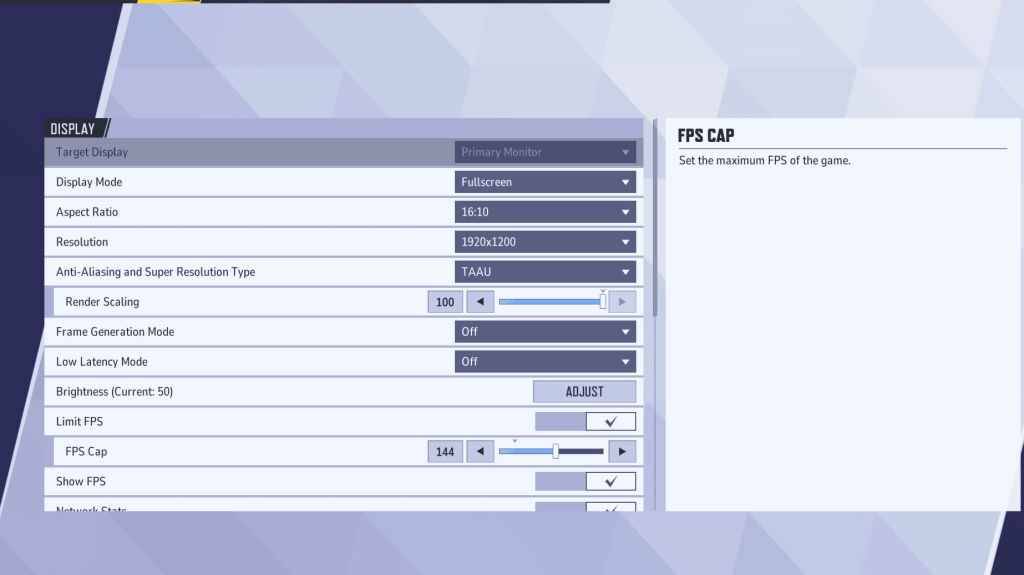
表示設定から始めます。 フルスクリーンモードは、すべてのシステムリソースをゲームに捧げ、FPSを最大化し、気晴らしを最小限に抑えるため、真面目なゲーマーに推奨されます。 ボーダーレスウィンドウモードは、頻繁にaltタビングする人のための代替手段ですが、潜在的なFPSドロップと入力遅延に注意してください。
| Setting | Description | Best Setting |
|---|---|---|
| Display Mode | How the game is displayed. | Fullscreen (prioritizes performance); Borderless Windowed (easier multitasking) |
| Resolution | Game resolution. | Monitor's Native Resolution |
| Aspect Ratio | Width and height ratio of the game display. | Monitor's Native Aspect Ratio |
| Anti-aliasing & Super Resolution | Technologies for anti-aliasing and resolution scaling. | Experiment to find optimal balance between visuals and performance. |
| Frame Generation | Varies by PC; TAAU is generally safe, but experiment for best performance. | Off |
| Low Latency Mode | Reduces input lag (Nvidia GPUs only). | On + Boost (if available) |
| V-Sync | Synchronizes frame rate with monitor refresh rate; may introduce input lag. | Off |
| Limit FPS | Caps maximum frame rate; stabilizes performance and reduces GPU strain. | Monitor's refresh rate |
| Show FPS | Displays current FPS on-screen. | On |
| Network Stats | Displays network statistics. | On |
マーベルライバル:最適なグラフィックス設定
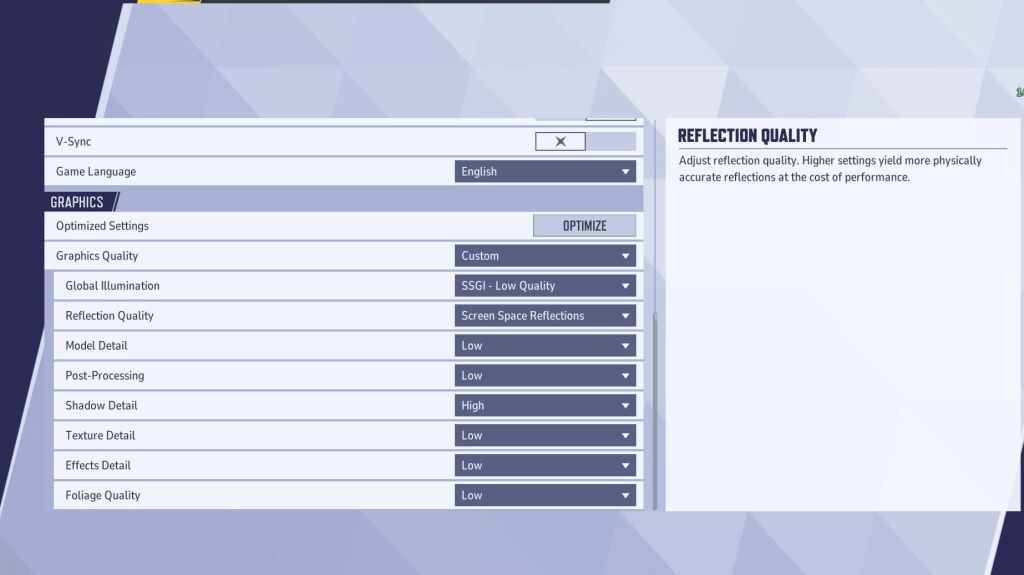
グラフィック設定はパフォーマンスに大きな影響を与えます。競争力のあるプレイの視覚的忠実度よりもパフォーマンスを優先します。よりスムーズで応答性の高いゲームプレイのために、ほとんどの設定を低く設定します。ハイエンドPCは、視覚を改善するために中程度または高設定で実験できます。
| Setting | Description | Best Setting |
|---|---|---|
| Graphics Quality | Preset adjusting multiple visual settings. | Custom |
| Global Illumination | Simulates light bouncing; higher settings are more realistic but demanding. | SSGI – Low Quality |
| Reflection Quality | Clarity and realism of reflections. | Screen Space Reflections |
| Model Detail | Complexity and realism of character and object models. | Low |
| Post-Processing | Visual effects like motion blur and depth of field; can reduce frame rates. | Low |
| Shadow Detail | Sharpness and quality of shadows; higher settings impact performance. | High |
| Texture Detail | Resolution of in-game textures; higher settings require more VRAM. | Low |
| Effects Detail | Quality of visual effects; lowering reduces clutter and boosts performance. | Low |
| Foliage Quality | Density and detail of environmental elements; lower settings improve FPS in outdoor scenes. | Low |
ゲームとWindowsの両方の設定でマウス加速度を無効にして、照準精度を改善します。
マーベルライバル:最適なオーディオ設定
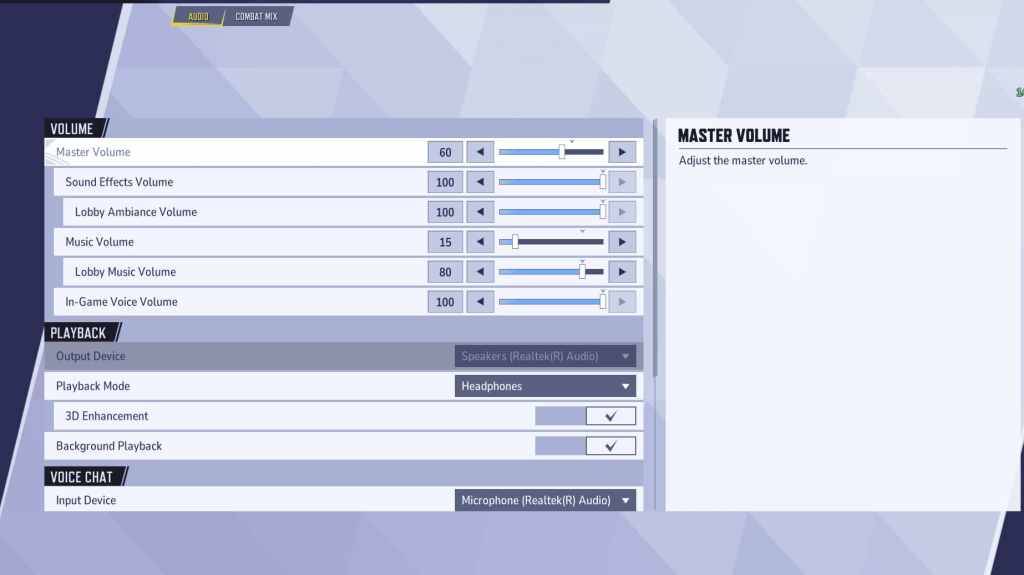
オーディオはゲームプレイを大幅に強化します。敵の動きを特定するのを助けるために、空間音を改善するための3D強化を有効にします。 hrtf **(利用可能な場合)を使用して、さらに優れたオーディオキューを行います。あなたの好みに合わせてボリュームレベルを調整します。
この包括的なガイドは、ピークパフォーマンスとゲームエクスペリエンスを強化するために、 マーベルライバル の設定を最適化するのに役立ちます。システムとプレイスタイルに合わせて、ビジュアルとパフォーマンスの完璧なバランスを実験して見つけることを忘れないでください。
 最新記事
最新記事









 最新のゲーム