Home
Home  Navigation


Why Should You Re-roll in Trickcal:Chibi Go?
Re-rolling is one of the most effective strategies for free-to-play players aiming for a strong and seamless start in Trickcal:Chibi Go. While it may take a few extra minutes initially, the benefits are substantial. A powerful early roster simplifies story progression, enhances your combat performance, and conserves valuable resources during your first weeks as a beginner. This guide walks you through everything—from the fundamentals of re-rolling to which apostles to prioritize, how gacha odds work, and how to execute rerolls efficiently.
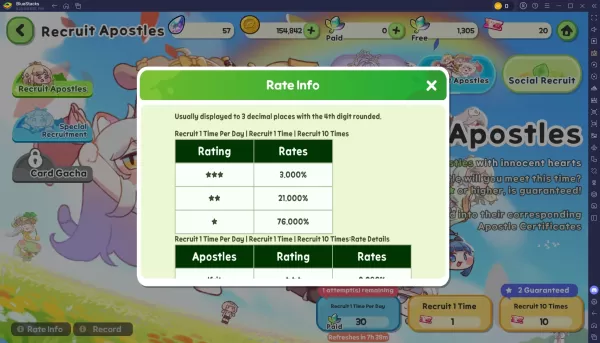
Know the Gacha Rates in Trickcal:Chibi Go
Before you begin, understanding the gacha pull rates helps set realistic expectations. Here are the base odds in Trickcal:Chibi Go:

Re-roll Faster in Trickcal:Chibi Go with BlueStacks
If you're playing on PC or laptop, using BlueStacks and its built-in features can significantly speed up the process. Start by setting up a master instance and installing the game without logging in. Then, clone this instance multiple times, depending on your system’s capabilities. With the synchronization feature, you can manage several instances simultaneously and run multiple rerolls at once. If a batch doesn’t yield your desired units, just delete the cloned instances and recreate them from your clean master instance.
Players can enjoy Trickcal:Chibi Go on a larger screen with full keyboard and mouse control through BlueStacks.
Continue your journey in Trickcal:Chibi Go with our other detailed guides.
 Latest Articles










 Latest Games