9zxz.comHome NavigationNavigation
Home >  News >  Best Settings for Fortnite Ballistic

Best Settings for Fortnite Ballistic

Author : Logan Update:Jan 03,2025

Mastering Fortnite Ballistic: Optimal Settings for First-Person Combat

Fortnite’s new Ballistic mode introduces a first-person perspective, a significant departure from the game's standard third-person view. This guide highlights the crucial settings adjustments needed to excel in this fast-paced, competitive mode.
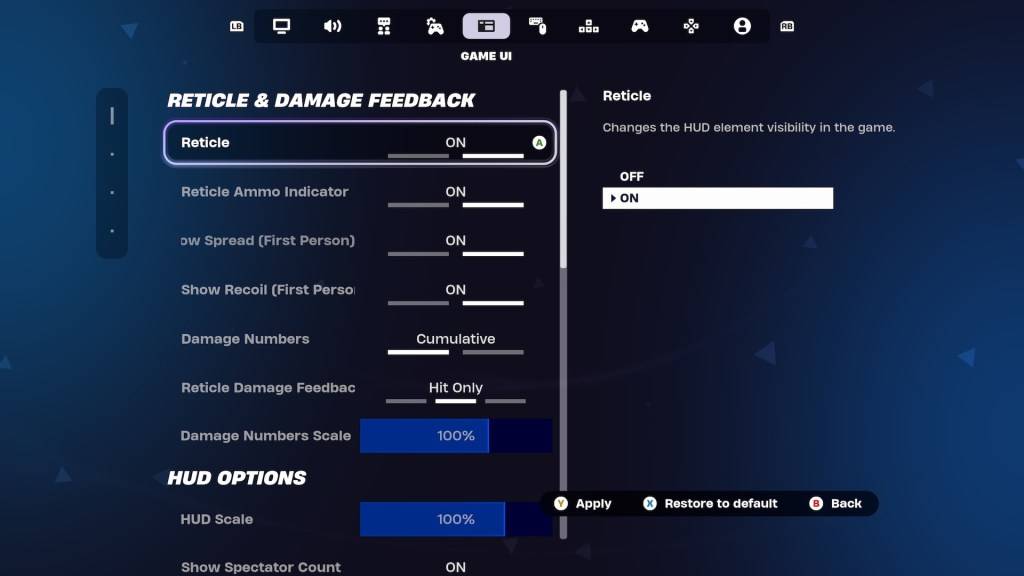
Settings in Fortnite Ballistic.

Experienced Fortnite players often have finely-tuned settings. Fortunately, Ballistic offers specific first-person setting adjustments within the Game UI's Reticle & Damage Feedback tab. Let's explore the key options and recommended configurations:

Show Spread (First Person): Off

This setting typically expands the reticle to visualize weapon spread. However, in Ballistic, hip-firing proves surprisingly effective, negating the need for this visual aid. Disabling "Show Spread" simplifies reticle focus and enhances headshot accuracy.

Show Recoil (First Person): On

Recoil is a major factor in Ballistic. Keeping "Show Recoil" enabled allows the reticle to reflect recoil, providing valuable feedback, especially when using powerful weapons like Assault Rifles. While the reduced accuracy is a trade-off, the weapons' power compensates.

Advanced Option: No Reticle

For highly skilled players aiming for top-tier performance in ranked matches, completely disabling the reticle offers maximum control. This requires exceptional aim and game sense, however, and is not recommended for casual players.

These adjustments optimize your Fortnite Ballistic experience. For further competitive advantages, consider exploring other gameplay enhancements like Simple Edit in Battle Royale.

Fortnite is available on multiple platforms, including Meta Quest 2 and 3.

Latest Articles
  • MLB Rivals kicks off 2025 postseason with new Playoff Hero Moment Cards and refreshed mechanics

    ​ New 2025 postseason is now liveClub Battle has been overhauled to be more tacticalNew Playoff Hero Moment cards introduce historical playersCom2uS is in position for October with MLB Rivals’ 2025 Postseason update, rolling out a slate of events, rewa

    Author : Alexander View All

  • Makeover Star Angela with Glam Hairstyles

    ​ My Talking Angela 2 elevates glamour with its newest addition: the Hair Salon feature.Style, color, and cut Angela's hair to create a stunning, transformative new look.Share your unique creations with the world.Since its launch in 2021, My Talking An

    Author : Evelyn View All

  • Outer Worlds 2: Pre-orders and DLC Details

    ​ The Outer Worlds 2 was officially unveiled at The Game Awards 2024! This guide covers how to pre-order the game, its pricing, and details on any special editions or downloadable content (DLC). ← Back to The Outer Worlds 2 main articleThe Outer Worlds

    Author : Audrey View All

Topics
Online Shopping Made Easy: A Comprehensive Review
Online Shopping Made Easy: A Comprehensive ReviewTOP

Discover the best online shopping apps for seamless and convenient shopping experiences. This comprehensive review explores top-rated apps like ALDI SÜD Angebote & Prospekte for grocery deals, UNIQLO CA and UNIQLO MY for fashion, dahaboo for diverse products, FINN.no for Norwegian classifieds, Esdemarca for Spanish deals, Route for package tracking, Clicks for South African pharmacy needs, Carrefour Italia for Italian groceries, and B&H Photo Video for electronics. Find the perfect app to simplify your online shopping journey!